 SchemaPeek
On-page SEO audits in Chrome's side panel. No login.
SchemaPeek (formerly SEO Lens) checks headings, broken links, schema, hreflang, redirects and robots.txt on any page. No account, no tracking, and nothing runs until you click.
Works on any http(s) page · No signup · Private by design
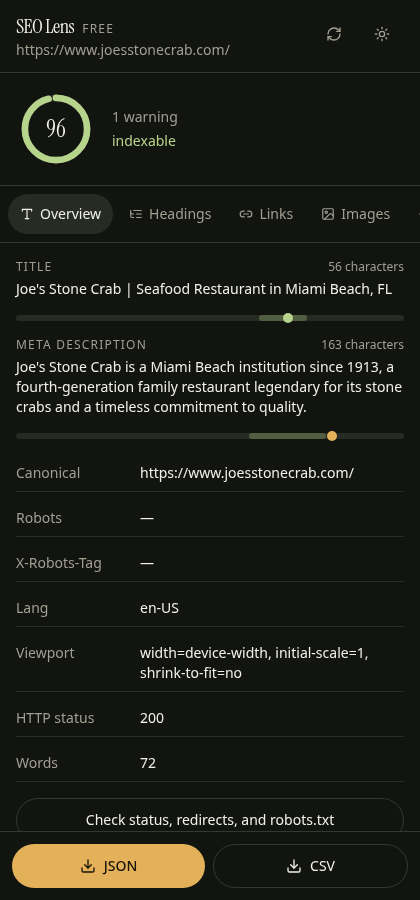
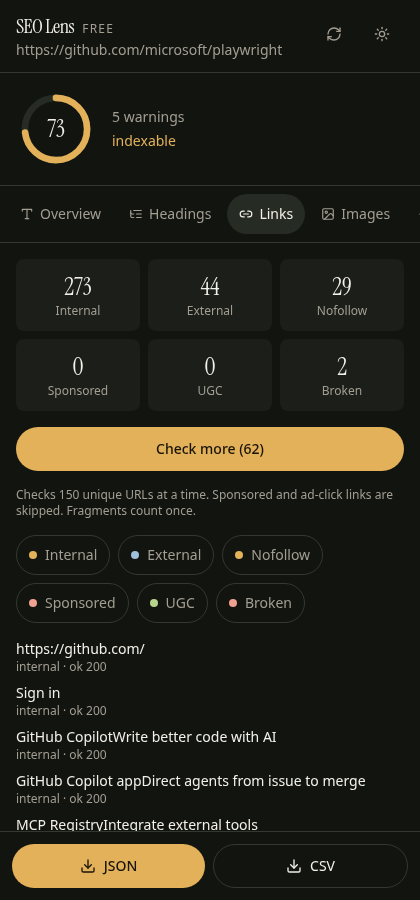
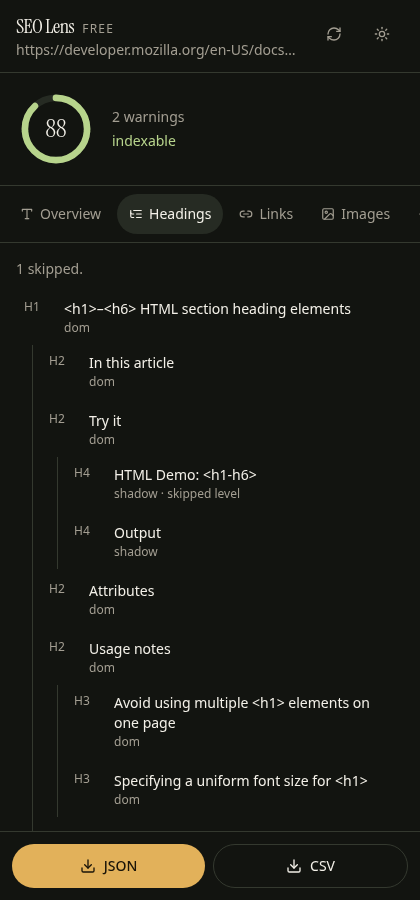
Everything you need for an on-page audit
Open the panel on any tab. SchemaPeek scores the page, lists issues, and lets you dig into headings, links, images, schema and social tags.
Score & issues
A 0–100 on-page score from 21 rules, with a matching toolbar badge that clears when you navigate away.
Basics
Title and description meters, canonical, meta robots, X-Robots-Tag, lang, viewport, word count and HTTP status.
Headings
Nested H1–H6 tree covering shadow DOM and same-origin iframes. Flags skipped levels and missing or multiple H1s.
Broken links
150 links per batch. "Blocked" (401/403/429/999) stays separate from "broken". Internal, external, nofollow, sponsored and UGC.
Schema & social
JSON-LD and microdata with invalid JSON and unknown types flagged. Rendered Open Graph and Twitter card previews.
robots.txt & hreflang
Does robots.txt actually block this URL? hreflang missing x-default and return links. Sitemap status included.
Images
Missing vs empty alt, dimensions and file sizes — including images inside shadow DOM.
Redirects
Real HTTP status codes and the redirect chain hop by hop, recorded in your browser.
Export
Copy or download CSV and JSON for every report. No account required.
Private by design
No login, no analytics SDK, no remote logging, and no SchemaPeek server. The audit runs in your browser.
- 0 KB loaded until you open the panel — then only on that tab
- Site access used narrowly to read the page you audit; nothing is uploaded
- Network checks (broken links, status, robots.txt, sitemap) go straight to the site you're checking
- No Moz cookies — SchemaPeek uses none
SchemaPeek vs MozBar
An honest look. SchemaPeek wins on free on-page depth and privacy. MozBar wins on domain metrics and SERP overlays.
Free on-page audits
- Broken-link checker with blocked vs broken
- robots.txt "blocks this URL?" check
- hreflang x-default + return links
- Microdata + schema warnings
- Shadow DOM headings and images
- 0 KB loaded until you click
- CSV/JSON export on every page
- No login, ever
Domain & keyword data
- Domain Authority, Page Authority, Spam Score, backlinks
- Keyword volume, difficulty, on-page grading (Pro)
- SERP overlay on Google, Bing, DuckDuckGo, Yahoo (Pro)
- Domain Overview, dockable toolbar, site block list
- A long track record — MozBar has over 1 million users
If DA and backlinks drive your work, keep MozBar or Moz Pro. For on-page audits, SchemaPeek is free and private, and it runs only when you ask. Many people will reasonably use both.
Side-by-side
Swipe the table sideways to see all columns.
| SchemaPeek | MozBar free (logged out) | MozBar with Moz Pro | |
|---|---|---|---|
| Price | Free | Free (limited) | Moz Pro from $49/mo (entry); Standard $99/mo or $79/mo yearly |
| Login | Never | No (on-page sections) | Moz account + subscription |
| Broken-link checker | ✓ | ✗ | ✗ |
| robots.txt "blocks this URL?" | ✓ | link only | link only |
| hreflang x-default + return links | ✓ | ✗ | ✗ |
| Microdata + schema warnings | ✓ | ✗ | ✗ |
| Shadow DOM headings/images | ✓ | ✗ | ✗ |
| On-page score + issue list | ✓ (21 rules) | ✗ | keyword-specific grader |
| CSV/JSON export | ✓ every page | ✗ | CSV for SERP/page metrics |
| JS loaded on every page | 0 KB until you click | 332 KB | 332 KB |
| DA / PA / backlinks | ✗ | ✗ | ✓ |
| Keyword volume / difficulty | ✗ | ✗ | ✓ |
| SERP overlay engines | Google (unverified live) | 4 engines, no metrics logged out | 4 engines with metrics |
Based on SchemaPeek 1.0.0 and MozBar 5.0.17 as tested on 2026-10-21. Moz pricing from moz.com/products/pro/pricing on that date.
FAQ
Straight answers. No fluff.
Is SchemaPeek really free?
Yes. Every feature on this page is free and there's no account. Paid domain metrics aren't part of SchemaPeek today. Everything listed here is 100% free.
Does it collect my browsing data?
No. It has no analytics, no server and no account. It reads a page only when you open the panel on it. See the privacy policy.
Why does it ask for site access?
SchemaPeek needs site access to read the page you audit, runs nothing until you click, and sends no data. Chrome's side panel doesn't reliably get access to the current tab without it, and the checks you start (broken links, file sizes, status/redirects, robots.txt, sitemap) request those URLs directly from your browser. The only optional permission is webRequest, which records redirect hops; decline it and you just see the final URL.
Does it show Domain Authority?
No. DA is Moz's proprietary metric. On the roadmap: optional bring-your-own-API-key domain metrics, with keys stored only on your computer.
Which browsers?
Chrome (it uses the Chrome side panel). Other Chromium browsers haven't been tested yet.
Can I use it alongside MozBar?
Yes. The two don't conflict.
Wasn't this called SEO Lens?
Yes. SchemaPeek was formerly SEO Lens. Same extension, same Chrome Web Store listing, new name so it isn't confused with other products.
Audit your next page in one click
No login. No tracking. Nothing runs until you click.
Add to Chrome, it's free